The following may be a bit redundant as it has been part of many of my “JavaScript hacks” posts, but I’m asked so often I thought I would put it in a article by itself.
The Content Editor Web Part (CEWP)
SharePoint 2007 gave us a nice little web part to insert HTML, CSS, JavaScript, and even just some text, in any web part page. SharePoint 2010 “broke” this web part a bit by trying to “fix up” our code. Add a little JavaScript to a CEWP and you will get this message:

The message may mean that it did nothing to your code, reformatted your code (in strange ways), or completely removed your code!
Here’s a before and after of a “reformat”:

![clip_image002[4]](file:///C:\MikeSmith\Users\MAX\AppData\Local\Temp\WindowsLiveWriter1286139640\supfiles11B14749\image14.png "clip_image002[4]")
Link to your custom code, don’t add it directly to the CEWP
For both 2007 and 2010 the best practice is to link from the CEWP to a text file with your content. To avoid the problem with the random edits made by 2010 just upload a text file containing the code to a library. Then in the CEWP just click the Edit Web Part option in the dropdown and add the link to the code file. This has added benefit of using any HTML, CSS and JavaScript editor such as Visual Studio or SharePoint Designer to edit your code.
Steps:
- Create your HTML, CSS and/or JavaScript in a text file, Notepad will do, and save it with any file extension.
Tip: Name your file with a .HTM extension and then the SharePoint libraries will add a “Edit in SharePoint Designer” link in the file’s dropdown menu!
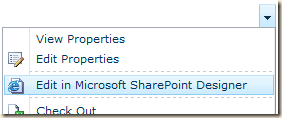
Notes: Your JavaScript should be enclosed in <script> tags and your CSS should be enclosed in <style> tags.
- After uploading to a library, right-click the file’s name and copy the shortcut
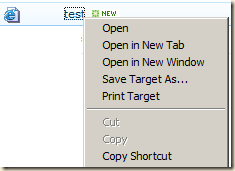
- Go go your SharePoint and insert a Content Editor Web Part
(2010 on the left, 2007 on the right)
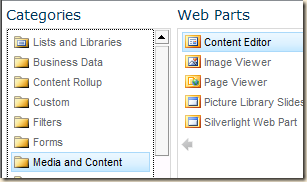
![clip_image002[9]](//lh4.ggpht.com/-Za23KL3w5lQ/TzNTC3txAEI/AAAAAAAABHU/Js9tI-KZxb8/clip_image002%25255B9%25255D_thumb.jpg?imgmax=800 "clip_image002[9]")
- Click the web part’s dropdown menu and click Edit
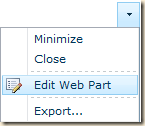
- Paste the URL to the Notepad file in the Content Link box
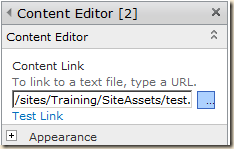
- Save your changes and test
And if you have any errors, just open the HTM file in SharePoint Designer, make your changes and save, and then go back to the browser and click refresh! Much faster than constantly editing and save the web part.


![clip_image002[9]](http://lh5.ggpht.com/-6tMdQMIjsZs/TzNTCh3PsoI/AAAAAAAABHM/27VDHCB77bc/s1600-h/clip_image002%25255B9%25255D%25255B2%25255D.jpg "clip_image002[9]")


Hide the title area
If the CEWP only contains HTML, CSS and/or JavaScript then you may want to hide the web part’s title bar. In the properties editor, expand Appearance, click the Chrome Type dropdown and select None.
![clip_image002[5]](http://lh5.ggpht.com/-qHSqqMtvNr0/TzNTD0Z2yjI/AAAAAAAABH8/7ea5zxRhHzo/s1600-h/clip_image002%25255B5%25255D%25255B2%25255D.jpg "clip_image002[5]")
Tip: Don’t “hide” the web part. Just turn off its title bar.
.

28 comments:
Hi Mike
I'm having a problem in that some javascript I've added to an edit for in a CEWP to change the background color of an item title only works when the page is is 'edit mode'. Here is the code:
_spBodyOnLoadFunctionNames.push("changeElement");
function changeElement() {
var control;
control = findacontrol("Hiring Manager");
//control.parentNode.parentNode.style.display="none";
control.parentNode.parentNode.style.background="#fffbc6";
I've never run into this before! Any ideas?
- Tracey
Tracey,
Do you have the CEWP Hidden property enabled?
Mike
I also have this issue. I get "Object Expected" in normal mode. What can cause this?
my code:
$(document).ready(function() {
updateListItem();
});
function updateListItem() {
var siteUrl = '/sites2/sppwgrqy/DashboardTest/';
var clientContext = new SP.ClientContext(siteUrl );
var oList = clientContext.get_web().get_lists().getByTitle('ReleaseSelected');
var Release = document.getElementById('ReleaseID').value;
this.oListItem = oList.getItemById(2);
//this.oListItem.set_item('Title', 'ReleaseID');
this.oListItem.set_item('ReleaseValue', Release );
this.oListItem.update();
//alert('updated' );
clientContext.executeQueryAsync(Function.createDelegate(this, this.onQuerySucceeded), Function.createDelegate(this, this.onQueryFailed));
}
function onQuerySucceeded() {
alert('Code Succeeded!');
}
function onQueryFailed(sender, args) {
alert('Request failed. ' + args.get_message() + '\n' + args.get_stackTrace());
}
Hank,
$(document).ready is not "SharePoint aware" and only knows that any events on the <body> onload have fired. A better choice is to add your function to an array of things to be called after SharePoint finished loading all page content.
_spBodyOnLoadFunctionNames.push("updateListItem");
Note that you only add the function name, not parans or parameters.
Another thing to consider is that SharePoint 2010 can load some content asyncronously. The calendar is a prime example, as is any list web part where you have turned on the AJAX features. These will require some custom JavaScript to intercept the SP JavaScript async calls.
Mike
Mike,
I followed your instructions above but I do not get any row colors in my list in SP 2010. Note that I use this exact script in a similar list in SP 2007 and it works fine. In the SP 2010 site I linked to the script in a txt file like you indicated. Below is the script. Is there anything different in 2010 that would cause this script not to work? ps - I removed the script tags so it would post ok
var colDueDate = 6;
var i=0;
d=new Date() //current date/time
var x = document.getElementsByTagName("TD") // find all of the TDs
for (i=0;i= Date.parse(x[i].parentNode.childNodes[colDueDate].childNodes[0].innerHTML) )
{
x[i].parentNode.style.backgroundColor='red'; // set the color
}
else if ((d.getTime()+2592000000) >= Date.parse(x[i].parentNode.childNodes[colDueDate].childNodes[0].innerHTML) )
{
x[i].parentNode.style.backgroundColor='yellow'; // set the color
}
}
}
}
Thanks... Mike
Mike,
I have used the below script on a 2007 list and it worked fine but when I use your steps above to upload the script to a library and then link to it on a similar SP 2010 list I cannot get it to work. No errors but no row colors. Do you see anything about this script that would not work in 2010?
Note that I removed the script tags so it would post ok:
var colDueDate = 6;
var i=0;
d=new Date() //current date/time
var x = document.getElementsByTagName("TD") // find all of the TDs
for (i=0;i= Date.parse(x[i].parentNode.childNodes[colDueDate].childNodes[0].innerHTML) )
{
x[i].parentNode.style.backgroundColor='red'; // set the color
}
else if ((d.getTime()+2592000000) >= Date.parse(x[i].parentNode.childNodes[colDueDate].childNodes[0].innerHTML) )
{
x[i].parentNode.style.backgroundColor='yellow'; // set the color
}
}
}
}
Thanks.. Mike
Mike,
For lists the code should work. Are you using this with a library? If so, are you using the AJAX async options?
What's the error message? You may want to add a TRY...CATCH block around the date related code. Blank date files would be a problem. Also, display the page, view the source and check to see if there is any HTML around the date.
And the standard point... make sure the Content Editor Web Part is placed below the list you want to change.
Mike
I am using this on a list. The script was uploaded to a library and then linked to in the CEWP. I tried removing the current if/else statements that compare dates and replaced it with a simple check to look for basic text:
if ((x[i].innerHTML)=="Test")
and this worked fine.
But when I edited it to look for that same text in a specific column:
var colText = 6;
if ((x[i].parentNode.childNodes[colText].innerHTML)=="Test")
This did not work. I tried changing the Var statement to other column numbers just to make sure I was stating the correct column number but no luck. I looked at the source but did not see any extra html around this script. The CEWP is below the list. Anything else I might be missing?
> I looked at the source but did not see any extra html around this script
Sorry... was there any HTML around the date?
Mike
Maybe I'm confused by what you mean by "around the date". Are you referring to the source code where it shows the dates as they are displayed in the individual rows or in the source code where it shows the contents of the script? sorry
I think I found the problem but not sure why this happens. I had the style of the view set to Newspaper. When I changed the style to Default, everything works fine. Weird. I tested it several times changing the style and it only would work with the Default style. I like having the style set to Newspaper since it adds divider lines between each row. Do you know a way for this script to work using the Newspaper style?
Newsletter and the other Styles change the HTML and CSS to add the lines or the "green bar" effect.
You may find that you need to add or remove a level from the .childNodes[...].childNodes[...] pattern to deal with the changes.
Also try setting the color one level deeper in the HTML:
x[i].parentNode.childNodes[0].style.backgroundColor='red';
Mike
I tried adding the addtl level to the color statement:
x[i].parentNode.childnodes[0].style.backgroundColor='red';
but that didn't work.
I am not familiar with how the childnodes[] works to understand your first part though. If I am going to add another level to this statement:
if (d.getTime() >= Date.parse(x[i].parentNode.childNodes[colDueDate].childNodes[0].innerHTML))
Would it be something like this:
if (d.getTime() >= Date.parse(x[i].parentNode.childNodes[colDueDate].childNodes[0].childNodes[1].childNodes[2].innerHTML))
Do you just keep increasing the # inside the [] after each new childnodes? Is there any easy way to find out what level a given element is?
> Do you just keep increasing the # inside the [] after each new childnodes?
No. The [0] means "first child at that level".
I'll see if I can put together and example. It may be a day or two.
Is your date field a normal date picker, a calculated field or a single line of text?
Its a normal date picker
btw - thanks for your help today. I look forward to the example
Mike
Mike,
not sure if my previous post went through but just in case...
Thanks for all your help today.
My date field is a normal date picker.
I look forward to your example.
Thanks... Mike
Hey Mike,
Just checking to see if you had a chance to do an example. If it helps, here is some additional information about the list I am trying to color code. The list is used to track training so the columns include things like name, office and training due date. I have the list grouped by the name column and am using the Newsletter (lined) style so it looks something like this:
Joe
-----------------------------
Training1 OfficeA 12/22/2013
-----------------------------
Training2 OfficeA 12/25/2014
-----------------------------
Beth
-----------------------------
Training1 OfficeB 1/25/2014
-----------------------------
etc, etc.
I need the script to locate the date field in each row to do a date comparison:
if (d.getTime() >= Date.parse(x[i].parentNode.childNodes[colDueDate].childNodes[0].innerHTML))
But can't yet figure out the parent\childnodes level to find the due date field in each row.
Thanks again for your help.
Mike
Hello Mike
Nice post, pointing me in the direction. I ordered your book also.
I have workflows that are hanging up and I was looking to add some code to restart the work flow. I found a script that does just that but I am not sure where is the best place to put the code. here is a short clip of the code
using System;
using System.Collections.Generic;
using System.Linq;
using System.Text;
using Microsoft.SharePoint;
using Microsoft.SharePoint.Workflow;
using Microsoft.SharePoint.Administration;
namespace WFRestart
{
public class WFRestart : SPJobDefinition
{
public WFRestart()
: base()
any recommendations? Thanks
Jeff
Jeff,
That is C# code and would need to be run from a Console application, a Windows application, a custom web part or other code app running on the SharePoint web servers. You won't be able to run that from JavaScript.
Mike
Hi There! I am experiencing an issue where the drop downs don't all appear within my company network when I use links as examples such as Bing or Microsoft. But if I use internal links (company specific), they all appear. Have you heard of such a thing? Is it the bluecoat blocking software of the organization?
Pam,
I don't know anything about "bluecoat", but that could be the issue. The links should otherwise work as they are just ordinary <A> anchor tags.
Hello Mike,
I am trying to use HighCharts in a content editor web part. I have multiple script tags in the web part some of them have code and some of them refer to the highcharts.js file that is located in my sandbox shared documents folder. I also changed the extension to .txt since it seems that SP2010 web part doesn't work well with js extension. Anyway, currently when I open the page with the web part, I get a message the highcharts object does not exist. Wondering if you have any insight into why I can seem to refer to a different script. Here is my code:
This is where the charts live
beginning script tag here
$(document).ready(function () {
$('#container').highcharts({
chart: {
type: 'bar'
},
title: {
text: 'Fruit Consumption'
},
xAxis: {
categories: ['Apples', 'Bananas', 'Oranges']
},
yAxis: {
title: {
text: 'Fruit eaten'
}
},
series: [{
name: 'Jane',
data: [1, 0, 4]
}, {
name: 'John',
data: [5, 7, 3]
}]
});
});
ending script tag here
Unknown:
I usually use .htm as the extension so I can open the file quickly in SharePoint Designer, but any should work.
Common causes for your issue:
highcharts.js is not getting loaded, or has not completely loaded by the time your code has run. You did not include the code to load the library. Might look something like:
<script src="http://yourserver/sites/yoursite/yourlibrary/highcharts.js"></script>
or
<script src="/sites/yoursite/yourlibrary/highcharts.js"></script>
Permissions: The user of the page does not have at least read access to your sandbox library.
Mike
Don't forget adding the type="text/javascript" attribute in the html script tag!
<script>alert("test");</script> is only executed during page edit mode when the "Minimal Download Strategy" Site Feature is activated. Deactivating the MDS Site Feature the script is executed both in page display and edit mode.
After adding the type="text/javascript" attribute in the html script tag Java Script will be executed both in page display and edit mode not dependent on the MDS Site Feature activated or not.
Hello Mike,
I have added a Content Editor Web part and linked it to a JavaScript. The page opens fine in SharePoint 2010 but in 2013 it doesn't show the contents of the web part. I have to refresh the page manually in SharePoint 2013 to see the content fetched by the JavaScript. Do you have a suggestion for the issue? I tried adding the reload function in JavaScript but it keeps refreshing the page indefinitely.
Any suggestion will be very helpful.
Thanks your time.
Ricky
Ricky,
Do you have the Minimal Download feature enabled? Try disabling that.
Mike
Thanks for taking time and replying. Minimal Download feature is not enabled, Mike. The page has 4 different web parts (2 list and 2 CEWP) and only one of them doesn't open in first try. I have to reload the page for this web part to open, others open fine and show content.
Thanks,
Ricky
Post a Comment